This is the first post in the “bashing bash” series to highlight problems in bash and convince systems and software engineers to help building a better alternative.
Bash is a very powerful and useful tool, doing a better job than many other shells and programming languages when used for the intended tasks. Still, it’s hard to believe that writing a software decades later can not be done better.
The problem
What does the following command do?
cp $src_file $dst_file
One might think it copies the given file to the specified destination. Looking at the code we can say it was the intention. What would actually happen? It can not be known from the line above. Each $src_file and $dst_file expand to zero to N arguments so unexpected things that could happen. The correct command would be
cp "$src_file" "$dst_file"
Forgetting the quotes or leaving them out assuming $src_file and $dst_file will always contain one bash word, expanding to exactly one argument each is dangerous.
Keeping quoting everything makes code cluttered.
The suggested solution
In NGS, $var expands to exactly one argument similar to "$var" in bash. The new syntax $*var, consistent with similar syntax in other NGS parts, would expand to zero to N arguments.
If you use AWS you probably use AWS CLI. This tool gives you control over your resources from the command line. AWS CLI can output the results of your commands in several formats. None of the formats seem to be useful for humans.
AWS CLI can output the data in the following formats:
JSON, the default – good for processing with jq or programming languages, definitely not good for a human looking at list of few or more instances.
text – good for processing with command line tools such as awk, very hard to read for a human.
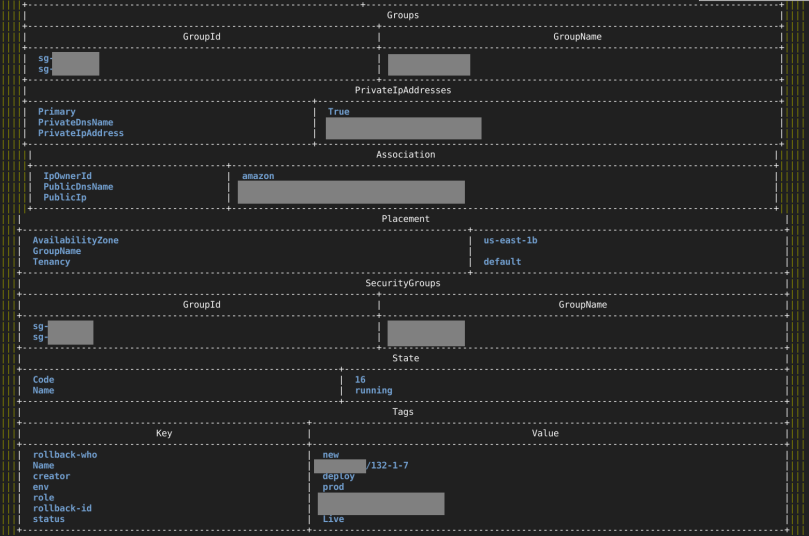
table – WTF? Probably meant for humans. Cluttered and difficult for a human to process. See the screenshot:
AWS CLI. List of instances. –output table. Is it for humans?
You can make it look better but what you see above is in no way reasonable default and making it look prettier should not be as unpleasing as described in the user guide towards the end of the page.
My takes on solving this
Take 1 – old script
I have a script which uses outdated Ruby AWS client which does not work with eu-central regions because it’s old. It was originally built for EC2 classic so it fails to show VPC security groups.
If newer regions and VPC security groups issues are solved this is a fine tool for human output.
Take 2 – JQ
While the old script is not fixes I have this temporary solution: jq transformation of AWS CLI output JSON (from my .bashrc_aws). The output is one line per instance.
It works well when there are no tags or small amount of tags per instance. With few tags on an instance, the line becomes too long and wraps. Reformatting sample output here for your convenience. Original is one logical line, wrapped, takes almost two lines in the terminal window.
The column after state (“running”) is the key name.
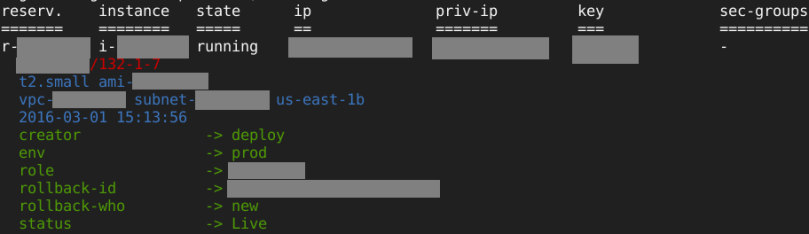
ec2din.ngs – human output
It would be better if actual available screen width would be considered so there would be no need to arbitrary trim security groups’ names and tags’ keys and values (the ... in the screenshot above).
How I think it should be solved
NGS (the new shell I’m working on) implements the Table type which is used to do the layout you see on “ec2din.ngs – human output” screenshot. Table is part of the standard library in NGS. As you see, it’s already useful in it’s current state. There is plenty of room for improvement and the plan is to continue improving Table beyond simply “useful”.
This is the right direction with the following advantages:
The script that needs to output a table (for example ec2din.ngs) does not deal with it’s layout at all, making it smaller and more focused on the data.
The script can set defaults but does not handle which columns are actually displayed and in which order. The Table type handles it using another NGS facility: config which currently gets the configuration from environment variables but should be able to read it from files and maybe other sources in future.
Output of tabular data is a very common task so factoring it out to a library has all the advantages of code deduplication.
I would also like the shell to automatically detect heuristically or otherwise which data comes out of the programs that you run and display accordingly. Most of the data that is manipulated in shells is tabular and could be displayed appropriately, roughly as ec2din.ngs displays it. Maybe ec2din.ngs will become unnecessary one day.
In my dream, the output is semantic so that the shell knows what’s on the screen and allows you to navigate for example to i-xxxxx part, press a key and choose which operation you would like to perform on the instance. When you pick an operation, the shell constructs a command for such operation and executes it exactly as if you typed it in (so it’s in history and all other CLI advantages over GUI apply).


 Ilya's blog