NGS unique features – exit code handling

smilies-1607163_640

How other languages treat exit codes?

Most languages that I know do not care about exit codes of processes they run. Some languages do care … but not enough.

Update / Clarification / TL;DR

  1. Only NGS can throw exceptions based on fine grained inspection of exit codes of processes it runs out of the box. For example, exit code 1 of test will not throw an exception while exit code 1 of cat will throw an exception by default. This allows to write correct scripts which do not have explicit exit codes checking and therefore are smaller (meaning better maintainability).
  2. This behaviour is highly customizable.
  3. In NGS, it is OK to write if $(test -f myfile) ... else ... which will throw an exception if exit code of test is 2 (test expression syntax error or alike) while for example in bash and others you should explicitly check and handle exit code 2 because simple if can not cover three possible exit codes of test (zero for yes,  one for no, two for error). Yes, if /usr/bin/test ...; then ...; fi in bash is incorrect! By the way, did you see scripts that actually do check for three possible exit codes of test? I haven’t.
  4. When -e switch is used, bash can exit (somewhat similar to uncaught exception) when exit code of a process that it runs is not zero. This is not fine grained and not customizable.
  5. I do know that exit codes are accessible in other languages when they run a process. Other languages do not act on exit codes with the exception of bash with -e switch. In NGS exit codes are translated to exceptions in a fine grained way.
  6. I am aware that $? in the examples below show the exit code of the language process, not the process that the language runs. I’m contrasting this to bash (-e) and NGS behaviour (exception exits with non-zero exit code from NGS).

Let’s run “test” binary with incorrect arguments.

Perl

> perl -e '`test a b c`; print "OK\n"'; echo $?
test: ‘b’: binary operator expected
OK
0

Ruby

> ruby -e '`test a b c`; puts "OK"'; echo $?
test: ‘b’: binary operator expected
OK
0

Python

> python
>>> import subprocess
>>> subprocess.check_output(['test', 'a', 'b', 'c'])
... subprocess.CalledProcessError ... returned non-zero exit status 2
>>> subprocess.check_output(['test', '-f', 'no-such-file'])
... subprocess.CalledProcessError: ... returned non-zero exit status 1

bash

> bash -c '`/usr/bin/test a b c`; echo OK'; echo $?
/usr/bin/test: ‘b’: binary operator expected
OK
0

> bash -e -c '`/usr/bin/test a b c`; echo OK'; echo $?
/usr/bin/test: ‘b’: binary operator expected
2

Used /usr/bin/test for bash to make examples comparable by not using built-in test in bash.

Perl and Ruby for example, do not see any problem with failing process.

Bash does not care by default but has -e switch to make non-zero exit code fatal, returning the bad exit code when exiting from bash.

Python can differentiate zero and non-zero exit codes.

So, the best we can do is distinguish zero and non-zero exit codes? That’s just not good enough. test for example can return 0 for “true” result, 1 for “false” result and 2 for exceptional situation. Let’s look at this bash code with intentional syntax error in “test”:

if /usr/bin/test --f myfile;then
  echo OK
else
  echo File does not exist
fi

The output is

/usr/bin/test: missing argument after ‘myfile’
File does not exist

Note that -e switch wouldn’t help here. Whatever follows if is allowed to fail (it would be impossible to do anything if -e would affect if and while conditions)

How NGS treats exit codes?

> ngs -e '$(test a b c); echo("OK")'; echo $?
test: ‘b’: binary operator expected
... Exception of type ProcessFail ...
200

> ngs -e '$(nofail test a b c); echo("OK")'; echo $?
test: ‘b’: binary operator expected
OK
0

> ngs -e '$(test -f no-such-file); echo("OK")'; echo $?
OK
0

> ngs -e '$(test -d .); echo("OK")'; echo $?
OK
0

NGS has easily configurable behaviour regarding how to treat exit codes of processes. Built-in behaviour knows about false, test, fuser and ping commands. For unknown processes, non-zero exit code is an exception.

If you use a command that returns non-zero exit code as part of its normal operation you can use nofail prefix as in the example above or customize NGS behaviour regarding the exit code of your process or even better, make a pull request adding it to stdlib.

How easy is to customize exit code checking for your own command? Here is the code from stdlib that defines current behaviour. You decide for yourself (skipping nofail as it’s not something typical an average user is expected to do).

F finished_ok(p:Process) p.exit_code == 0

F finished_ok(p:Process) {
    guard p.executable.path == '/bin/false'
    p.exit_code == 1
}

F finished_ok(p:Process) {
    guard p.executable.path in ['/usr/bin/test', '/bin/fuser', '/bin/ping']
    p.exit_code in [0, 1]
}

Let’s get back to the bash if test ... example and rewrite the it in NGS:

if $(test --f myfile)
    echo("OK")
else
    echo("File does not exist")

… and run it …

... Exception of type ProcessFail ...

For if purposes, zero exit code is true and any non-zero exit code is false. Again, customizable. Such exit code treatment allows the if ... test ... NGS example above to function properly, somewhat similar to bash but with exceptions when needed.

NGS’ behaviour makes much more sense for me. I hope it makes sense for you.

Update: Reddit discussion.


Have a nice weekend!

NGS unique features – execute and parse

I am developing a shell and a language called NGS. I keep repeating it’s domain specific. What are the unique features that make NGS most suitable for today’s system administration tasks (a.k.a “Operations” or hype-compatible word “DevOps”)?

This post is first in series that show what makes NGS unique.

one-979261_640

Execute and parse operator

Execute-and-parse operator … executes a command and parses it’s output. This one proved to be central in working with AWS API. Citing ec2din.ngs demo script:

``aws ec2 describe-instances $*filters``

The expression above returns a data structure. The command is run, the output is captured and then fed to parse() method. Whatever the parse() method returns is the result of the ``exec-and-parse syntax`` expression above.

Built-in parsing

By default, NGS parses any JSON output when running a command using ``exec-and-parse`` syntax. (TODO: parse YAML too)

In case with AWS CLI commands additional processing takes place to make the data structure coming out of exec-and-parse operator more useful:

  1. The top level of AWS responses is usually a hash that has one key which has an array as value: {"LoadBalancerDescriptions": [NGS, returns, this] } . While I can guess few reasons for such format, I find it much more useful to have an array as a result of running an AWS CLI command and that’s what NGS returns if you run ``aws ...`` commands.
  2. Specifically for aws ec2 describe-instances I’ve removed the annoyance of having Reservations list with instances as sub-lists. NGS returns flat instances list. Sorry, Amazon, this is much more productive.

Customizable parsing

What if you have your own special command with it’s own special output format?

The parsing is customizable via defining your own parse(s:Str, hints:Hash) method implementation. That means you can define how your command is parsed.

 No parsing

Don’t want parsed data? No problem, stick with the `command` syntax instead of ``command``. In case you need original data structure you can use `command`.decode_json() for example.

Why exec-and-parse is an operator?

Why adding an exec_parse() function would not be sufficient?

  1. Execute-and-parse is common operation in system tasks so it should be short. NGS has taken the pragmatic approach: the more common the operation, the shorter the syntax.
  2. Execute-and-parse should look similar `execute-and-capture-output` syntax which already existed when I was adding execute-and-parse.
  3. Making it an operator allows the command to be executed to be written in “commands syntax” (a bit bash-like) which is a better fit.

“I can add this as a function to any language!”

Sure but:

  1. Your chances of getting same brevity are not very good
  2. Making exec-and-parse as flexible as in NGS in other languages would be an additional effort
  3. ``some-command arg1 arg2`` – would it be exec_parse(['some-command', 'arg1', 'arg2']) ? How do you solve the syntax of the passed command? The array syntax does not look good here. Not many languages will allow you to have special syntax for commands to be passed to exec_parse().

If your language is not domain-specific for system tasks, adding exec-and-parse to it will be a task with dubious benefit.

How extreme opposite looks like

Just came across build configuration file of Firefox: settings.gradle (sorry, could not find a link to this file on a web in a sane amount of time). Here is excerpt with lines wrapped for convenience.

def commandLine = ["${topsrcdir}/mach", "environment", "--format",
    "json", "--verbose"]
def proc = commandLine.execute(null, new File(topsrcdir))
def standardOutput = new ByteArrayOutputStream()
proc.consumeProcessOutput(standardOutput, standardOutput)
proc.waitFor()

...

import groovy.json.JsonSlurper
def slurper = new JsonSlurper()
def json = slurper.parseText(standardOutput.toString())

...

if (json.substs.MOZ_BUILD_APP != 'mobile/android') {
...
}

Here is how roughly equivalent code looks in NGS (except for the new File(topsrcdir) which I don’t understand):

json = ``"${topsrcdir}/mach" environment --format json --verbose``
...
if json.substs.MOZ_BUILD_APP != 'mobile/android' {
...
}

Yes, there are many languages where exec-and-parse functionality looks like something in between Gradle and NGS. I don’t think there is one that can do what NGS does in this regard out of the box. I’m not saying NGS is better than other languages for all tasks. NGS is aiming to be better at some tasks. Dealing with I/O and data structures is definitely a target area.


Have a nice day!

Declarative primitives or mkdir -p for the cloud

After some positive feedback regarding the concept of declarative primitives I would like to elaborate about it.

Defining declarative primitives

Declarative primitives is just a description of existing techniques. I gave it a name because I’m not aware of any other term describing these techniques. The idea behind declarative approach is to describe the desired state or result and not particular command or operations to achieve it.

Example: mkdir -p dir1/dir2/dir3

The outcome of the command does not depend on current state (whether the directory exists or not). You describe the desired state: directories dir1, dir2 and dir3 should exist after the command is run. Note that mkdir dir1/dir2/dir3 does not have the same effect: it fails if dir1 does not exist or dir2 does not exist or if dir3 exists.

The phrase declarative primitives emphasizes granularity. Existing declarative tools for the cloud operate on many described resources, build dependency graphs and run in order that they decide. Declarative primitives provide a very flexible way to control a single resource or a group of few resources of the same type. The flexibility comes from granularity. You decide how you combine the resources. You can easily integrate existing resources. You can modify just the properties of your interest on the resources you choose. This approach is ideal of scripting in my opinion.

Where are declarative primitives for the cloud?

sky-414198_640

I believe that when writing a script, using mkdir -p should be similar to using AwsElb(...).converge() for example. I’m working on implementing it (as a library for the Next Generation Shell) and I’m not aware of any other project that does it.

There are many projects for managing the cloud, how are they different?

Here are the solutions that I’m aware of and how familiar I am with each one:

  1. CloudFormation – using frequently (I prefer YAML syntax for it)
  2. Terraform – I’ve read the documentation and bits of source code
  3. Cloudify – familiar with the product, made modules for it
  4. Puppet – was using it intensively on few different projects
  5. Chef – was using it intensively in many projects
  6. Ansible – unfamiliar with this one (only took a look at documentation) so not reviewing it below
  • All take the declarative approach. You describe many resources or the entire system and feed the description to the tool which in turn does all the work. None of these solutions was designed to provide you with the primitives that could be easily used in your scripts. These tools just don’t match my view regarding scripting.
  • These tools can do a rollback on error for example. They can do that precisely because they have the description of the entire system or big parts of it. It will take some additional work to implement rolling back using declarative primitives. The question is whether you need the rollback functionality …
  • Some of these tools can be made to work with different clouds relatively easily. Working with different clouds easily may also possible with declarative primitives but the library I’m currently working on does not have such goal.
  • Except for Chef, the tools in the list above use formats or DSLs not based on real programming languages. [Update 2019-05-26: This means that except for trivial cases you will be using some additional tool to generate the descriptions of desired states. (Practice proved me wrong, this means convoluted/unclear definitions sometimes)] Limited DSLs do not work. See Puppet and Ansible [Update 2019-05-26: with release 0.12, Terraform too] that started with simple description languages and now they are almost real programming languages … which where never designed as programming languages, which has consequences.
  • I’m not aware of any option in the tools above that lets you view definitions of existing resources, which prevents you from starting managing existing resources with these tools and from cloning existing resources. I have started implementing the functionality that lets you generate the script that would build an existing resource: SomeResource(...).code() . This will allow easy modification or cloning.
  • A feature missing both from these tools and from my library is generating a code to start with for a given resource type (say security group or load balancer). Writing CloudFormation definition for a type with many properties is a nightmare. Nobody should start from scratch. Apache or Nginx configuration files are good example of starting points. Similar should be done for the cloud resources.
  • Note that Chef and Puppet were originally designed to manage servers. I don’t have any experience using them for managing the cloud but I can guess it would be less optimal than dedicated tools (the first three tools).

Scripting the cloud – time to do it right!

Why CloudFormation is better than Chef and Puppet

Strange comparison, I know.

apple-926456_640

Scripting vs declarative approaches

The aspect I’m looking at is scripting (aka imperative programming) vs declarative approach. In many situations I choose the scripting approach over declarative because the downsides of declarative approach outweigh the benefits in the situations that I have.

Declarative approach downsides

Downsides of Chef, Puppet and other declarative systems? Main downsides are complexity and more external dependencies. These lead to:

  1. Fragility
  2. More maintenance
  3. More setup for anything except for the trivial cases

I can’t stress enough the price of complexity.

Declarative approach advantages

When the imperative approach would mean too much work the declarative approach has the advantage. Think of SQL statements. It would be enormous amounts of work to code them by hand each time. Let’s summarize:

  1. Concise and meaningful code
  2. Much work done by small amount of code

Value of tools

I value the tools by TCO.

Example 1: making sure a file has specific content. It could be as simple as echo my_content > my_file in a script or it could be as complex as installing Chef/Puppet/Your-cool-tool-du-jour server and so on…

Example 2: making sure that specific load balancer is set up (AWS ELB). It could be writing a script that uses AWS CLI or using declarative tools such as CloudFormation or Terraform (haven’t used Terraform myself yet). Writing a script to idempotently configure security groups and the load balancer and it’s properties is much more work than echo ... from the previous example.

While the TCO greatly depends on your specific situation, I argue that the tools that reduce larger amounts of work, such as in example 2, are more likely to have better TCO in general than tools from example 1.

“… but Chef can manage AWS too, you know?”

Yes, I know… and I don’t like this solution. I would like to manage AWS from my laptop or from dedicated management machine, not where Chef client runs. Also, (oh no!) I don’t currently use Chef and bringing it just for managing AWS does not seem like a good idea.

Same for managing AWS with Puppet.

Summary

Declarative tools will always bring complexity and it’s a huge minus. The more complex the tool the more work it requires to operate. Make sure the amount of work saved is greater than the amount of work your declarative tool requires to operate.

Opinion: we can do better

I like the scripting solutions for their relative simplicity (when scripts are written professionally). I suggest combined approach. Let’s call it “declarative primitives”.

Imagine a scripting library that provides primitives AwsElb, AwsInstance, AwsSecGroup and such. Using this primitives does not force you to give up the flow control. No dependency graphs. You are still writing a script. Minimal complexity increase over regular scripting.

Such library is under development. Additional advantage of this library is that the whole state will be kept in the tags of the resources. Other solutions have additional state files and I don’t like that.

Sample (NGS language) censored code that uses the library follows:

my_vpc_ancor = {'aws:cloudformation:stack-name': 'my-vpc'}

elb = AwsElb(
    "${ENV.ENV}-myservice",
    {
        'tags': %{
            env ${ENV.ENV}
            role myservice-elb
        },
        'listeners': [
            %{
                Protocol TCP
                LoadBalancerPort 443
                InstanceProtocol TCP
                InstancePort 443
            }.n()
        ]
        'subnets': AwsSubnet(my_vpc_ancor).expect(2)
        'health-check': %{
            UnhealthyThreshold 5
            Timeout 5
            HealthyThreshold 3
            Interval 10
            Target 'SSL:443'
        }.n()
        'instances': AwsInstance({'env': ENV.ENV, 'role': 'myservice'}).expect()
    }
)

elb.converge()

It creates a load balancer in an already existing VPC (which was created by CloudFormation) and connects existing instances to it. The example is not full as the library is work in progress but it does work.


Have fun and watch your TCO!

Bash – opinionated review

Pros

  1. Huge immediately available “library” of external commands, providing lots of out-of-the-box functionality. You don’t even need to “import” or “require” to get it.
  2. Easy manipulation of files and processes with good syntax for these tasks
  3. Pipes make combining programs very easy
  4. Always installed (OS X comes with version 3 for some reason, version 4 is easily installable).

The pros above make bash the best language for many system tasks (and not Ruby, Perl or Python for example).

Cons

  1. Horrible syntax for general purpose programming tasks (read anything that is not a process or file manipulation), probably consequence of bash not being designed as a programming language. Language features were added with time in a backwards compatible way. The syntax looks really bad.
  2. No nested data structures
  3. No exceptions
  4. No named function parameters
  5. Subshells are forks, preventing global variables changes to be visible outside of the subshell. Combined with very “interesting” rules of what is a subshell and what is not, this behaviour can be surprising.
  6. Default behaviour is not to exit if one of the commands returns an error (use set -e to change)
  7. Default behaviour is to treat unset variables as empty strings (use set -u to change)
  8. Behaviour switches with setAction at a distance anti-pattern
  9. Default prompt does not include critical information: exit code of the last command
  10. No semantic understanding of the output and hence no command line completion based on output of previous commands. What makes me angry the most, completing apt-get install HERE will use the whole available packages list, not the output of the apt-cache search ... you just used to find your package while most of the time completing based on the output would be the right thing.
  11. History includes the commands and sometimes timestamps but no relevant context such as working directory, relevant variables’ values, exit code, etc…
  12. Inconvenient programming

What’s being done about the numerous cons?

I don’t see much being done about these in bash. Backwards compatibility and the fear of potentially breaking huge amount of existing code is probably the reason.

There are alternative shells being/were developed. Unfortunately for compatibility and other reasons they don’t seem to address all of the cons. Some of this projects ruin the simple syntax for process and file manipulation by basing themselves on an existing general purpose programming language.

against-the-current-1356062_640

NGS, a new and completely different shell, does aim to fix all the cons while keeping the positive aspects of shell programming.

The bigger part of the language is already implemented. See how it looks like.

You are welcome to join the project.

Recommended tools – tmux

Project URL: https://tmux.github.io/

Tmux is a newer take on screen.

tmux is a terminal multiplexer: it enables a number of terminals to be created, accessed, and controlled from a single screen. tmux may be detached from a screen and continue running in the background, then later reattached.

My usage pattern

And/or:

  1. Locally in one or more of terminal tabs. This keeps number of terminal tabs sane. I mostly use splits and occasionally tabs inside tmux.
  2. Remotely for avoiding multiple ssh connections, critical tasks, poor connection.

I’d recommend these navigation keys:

bind-key -n C-Left select-pane -L
bind-key -n C-Right select-pane -R
bind-key -n C-Up select-pane -U
bind-key -n C-Down select-pane -D

bind-key -n C-S-Left switch-client -p
bind-key -n C-S-Right switch-client -n
bind-key -n S-Left prev
bind-key -n S-Right next
bind-key -n M-j prev
bind-key -n M-k next
bind-key -n C-M-z resize-pane -Z

For a remote machine I suggest setting pane navigation keys to M-Left/Right/Up/Down. This way instead of hitting Ctrl+b C-Left or worse Ctrl+b Ctrl+b Left you just hit Alt+Left (aka Meta+Left).

Pros

  1. Zoom mode.
  2. Saner default prefix key Ctrl+b as opposed to screen’s Ctrl+a. Outside screen Ctrl+a usually jumps to beginning of a line and I use this shortcut frequently.
  3. Multiple copy buffers. See the prefix = shortcut in the manual.

Cons

  1. Mouse selection and scrolling behaves different than in plain terminal. The regular mouse selection can be done with Shift but still…
  2. I have not automated setting up remote machines’ tmux.conf automatically yet. That would be a huge win.


Recommended tools – VIM

Vim is a text editor. http://www.vim.org/

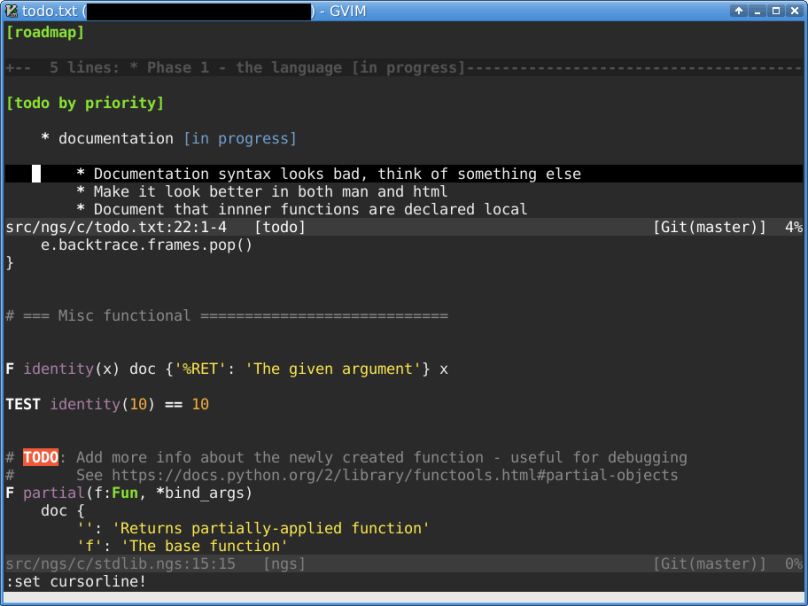
vim
GVim window with horizontal split, no tabs, using darkspectrum theme, viewing NGS project.

My usage pattern

GVim window. Using Vim in it’s own window as opposed to using it inside the terminal prevents unwanted interactions with terminal shortcuts. I use splits, occasionally tabs. Two :colorschemes I use, depending on the light conditions around me are default and darkspectrum (from vim-scripts Debian package).

Notable plugins

  1. CtrlP
  2. Fugitive
  3. Syntastic
  4. Tabular

Pros

  1. Very powerful editing commands – this works well with the dot (.) command for repetition.
  2. Highly customizable
  3. Can save and load the whole layout (open files, tabs, splits) to a file. See :mksession
  4. Supports C well, including showing the warnings and errors inside the editor after you save a file.
  5. Ability to record and play macros.
  6. Many useful plugins, including the one that displays the git branch. The the bottom right part of the screenshot.
  7. Remote files editing.

Cons

  1. Vim is not an IDE. Don’t expect features such as refactoring.
  2. I haven’t found the perfect mechanism for navigation between files in a project. The Ctrl-P plugin is somewhat helpful. :BufExplorer also helps. Still doesn’t feel 100% right.

Using Vim in a terminal with tmux

As I mentioned, I don’t usually use Vim this way but some people seem to be very happy to use the terminal+tmux+vim combo.

Nice video about using Vim with tmux: https://www.youtube.com/watch?v=5r6yzFEXajQ

Why not Emacs?

Vim and Emacs are the two best editors I’ve seen. I don’t think either one is better. They are just very different. I have tried Emacs several times. Last time lasted several months. Each time it just did not feel right for me.

The sudo fraud

Dear systems engineers,

It really amazes me how people are fine with typing sudo all the time. A kitten is denied a new toy for another day when you do this!

cat-96877_640

Typing sudo locally all the time

Is it really simpler for you to type sudo all the time rather than having one terminal tab open with a root shell? Besides, some systems even ask for a password when you run a sudo command. Be honest with yourself, are you a masochist?

Using sudo on servers

Security

Intro: each Amazon image comes with standard username for logging in. Never seen anyone changing that username.

Supposedly, the attacker would need to know the username in addition to your stolen private key. Right… and it’s not one of these: ubuntu, admin, ec2-user, centos … and looking at your ssh banner won’t give any clue as to which username is used:

SSH-2.0-OpenSSH_... Ubuntu..
SSH-2.0-OpenSSH_... Debian...
SSH-2.0-OpenSSH_6.6.1

OK, Amazon Linux did some homework but who uses it anyway. Red Hat also doesn’t say what it is. Both use ec2-user… You could customize the username but did you? So much for knowing the username.

Or maybe you think the potential attacker would not be able to run  sudo -i ?

“It stops you from doing stupid things”

Really? Do you do a mental pause and re-read your command once again when you type sudo? I’ve seen this not happening. If you are like me and you manage the servers, a big portion of commands require root, so people are just typing sudo without thinking.

Better train yourself to make a mental pause before executing destructive commands.

Conclusion

We could launch an another space mission if we would use the time people wasted on typing sudo . If you manage a server, use root. It really saves time. Do you really enjoy redoing half of your commands after “oh.. I forgot sudo … again”?

Are you afraid to kill the server? If killing one server is such a great deal, your situation might really be special but chances are that you just don’t manage your servers right. Fix that instead of typing sudo again and again.

And guys… have fun with your servers!

Update 2016-07-09 05:58 UTC

Just to be clear: Please note it’s filed under the “Rant” category. The post has some valid points but don’t take it too seriously. Use your best judgment to decide which parts of the above apply to your situation.

Bashing bash – unexceptional

This is the third post in the “bashing bash” series. The aim of the series is to highlight problems in bash and convince systems and software engineers to help building a better alternative.

The problem

What is the output of the following script?

#!/bin/bash

set -eu

echo Here
false
echo Not here

Right, the output is

Here

Imagine that instead of false you have a lot of code. Since there are no exceptions, you have no idea where the error occurred.

inspector-160143_640

Solutions using bash:

  1. Use set -x to trace the code.
  2. Add echo something every here and there to know between which two echo‘s the error occurred.
  3. Catch the error using trap and print the line number as suggested on StackOverflow . Writing this additional catching snippet at the top of every script is not really convenient.

This problem of unclear error location is unimaginable in any normal programming language.

“There is no problem, just don’t do it”

Bash was not intended to be a “normal” programming language. Some people say it’s an abuse of bash to use it as such. Looking at the code written in Bash I can tell it really is an abuse in many cases.

The reality though is that bash is still (ab)used for programming. In some cases Bash has positive aspects which outweigh the need to use other languages. In other cases a program starts as a small Bash script and is just not rewritten in another language after the script grows.

I suggest making a better shell rather than convincing people not to abuse Bash. People will keep on doing what they are doing. Let’s make their lives easier by providing them with a better shell.

The suggested solution

Use NGS. In NGS, any failed process throws an exception. Let’s take a look at the script below

#!/usr/bin/env ngs
echo Here
false
echo Not here

What’s the output?

Here
Not here

WAT?

Well, actually false returning an exit code of 1 is not an exception, it’s normal. If any command returning non-zero code would cause an exception, you wouldn’t be able to write for example if $(test -e myfile) do_something .

Failed process is a process that returns an unexpected exit code. Here is the part of stdlib that defines what’s a fail and what’s not:

F finished_ok(p:Process) p.exit_code == 0

F finished_ok(p:Process) {
    guard p.executable.path == '/bin/false'
    p.exit_code == 1
}

F finished_ok(p:Process) {
    guard p.executable.path == '/usr/bin/test'
    p.exit_code in [0, 1]
}

Such definitions also mean that you can easily extend NGS to work properly with any other command, simply by adding another finished_ok function. (Or add it to stdlib if it’s a common command so everyone would benefit).

So where are the exceptions?

We’ll have to modify the code to get an unexpected exit code. Example:

#!/usr/bin/env ngs
echo Here
ls nosuchfile
echo Not here

Output:

Here
ls: cannot access 'nosuchfile': No such file or directory
========= Uncaught exception of type 'ProcessFailed' =========
====== Exception of type 'ProcessFailed' ======
=== [ backtrace ] ===
[Frame #0] /etc/ngs/bootstrap.ngs:158:1 - 158:10 [in <anonymous>]
[Frame #1] /etc/ngs/bootstrap.ngs:154:17 - 154:29 [in bootstrap]
[Frame #2] ./2.ngs:3:4 - 3:14 [in <anonymous>]
[Frame #3] /usr/share/ngs/stdlib.ngs:1116:11 - 1116:15 [in $()]
[Frame #4] /usr/share/ngs/stdlib.ngs:1050:29 - 1050:42 [in wait]
[Frame #5] /usr/share/ngs/stdlib.ngs:1006:7 - 1006:20 [in ProcessFailed]
=== [ dump process ] ===
(a lot of not very well formatted output with info about the process)

Please help building a better alternative

Go to https://github.com/ilyash/ngs/ and contribute some code.

Fundamental flaws of bash and its alternatives

pebbles-1335479_640

Quoting Steve Bourne from  An in-depth interview with Steve Bourne, creator of the Bourne shell, or sh:

I think you are going to see, as new environments are developed with new capabilities, scripting capabilities developed around them to make it easy to make them work.

Cloud happened since then. Unfortunately, I don’t see any shells that could be an adequate response to that. Such shell should at the very least have data structures. No, not like bash, I mean real data structures, nested, able to represent a JSON response from an API and having a sane syntax.

In many cases bash is the best tool for the job. Still, I do think that current shells are not a good fit for today’s problems I’m solving. It’s like the time has frozen for shells while everything else advanced for decades.

As a systems engineer, I feel that there is no adequate shell nor programming language exist for me to use.

Bash

Bash was designed decades ago. Nothing of what we expect from any modern programming language is not there and somehow I get the impression that it’s not expected from a shell. Looks like years changed many things around us and bash is not one of them. It changed very little.

Looks like it was designed to be an interactive shell while the language was a bit of afterthought. In practice it’s used not just as an interactive shell but as a programming language too.

What’s wrong with bash?

Sometimes I’m told that there is nothing wrong with Bash and another shell is not needed.

Even if we assume that nothing is wrong with Bash, there is nothing wrong with assembler and C languages either. Yet we have Ruby, Python, Java, Tcl, Perl, etc… . Productivity and other concerns might something to do with that I guess.

… except that there are so many things wrong with bash: syntax, error handling, completion, prompt, inadequate language, pitfalls, lack of data structures, and so on.

While jq is trying to compensate for lack of data structures can you imagine any “normal” programming language that would outsource handling of data? It’s insane.

Silently executing the rest of your code after an error by default. I don’t think this requires any further comments.

Do you really think that bash is the global maximum and we can’t do better decades later?

Over the years there were several attempts to make a better alternative to bash.

Project Focus on shell and shell UX Powerful programming language
Bash No No
Csh No No
Fish shell Yes No
Plumbum No Yes, Python
RC shell No No
sh No Yes, Python
Tclsh No Yes, Tcl
Zsh Yes No

You can take a look at more comprehensive comparison at Wikipedia.

Flaw in the alternatives

A shell or a programming language? All the alternatives I’ve seen till this day focus either on being a good interactive shell with a good UX or on using a powerful language. As you can see there is no “yes, yes” row in the table above and I’m not aware of any such project. Even if you find one, I bet it will have one of the problems I mention below.

Focusing on the language

The projects above that focus on the language choose existing languages to build on. This is understandable but wrong. Shell language was and should be a domain-specific language. If it’s not, the common tasks will be either too verbose or unnecessarily complex to express.

Some projects (not from the list above) choose bash compatible domain-specific language. I can not categorize these projects as “focused on the language” because I don’t think one can build a good language on top of bash-compatible syntax. In addition these projects did not do anything significant to make their language powerful.

Focusing on the interactive experience

Any projects that I have seen that focus on the shell and UX do neglect the language, using something inadequate instead of real, full language.

What’s not done

I haven’t seen any domain-specific language developed instead of what we have now. I mean a language designed from ground up to be used as a shell language, not just a domain-specific language that happened to be an easy-to-implement layer on top of an existing language.

Real solution

Do both good interactive experience and a good domain-specific language (not bash-compatible).

List of features I think should be included in a good shell: https://github.com/ilyash/ngs/blob/master/readme.md

Currently I’m using bash for what it’s good for and Python for the rest. A good shell would eliminate the need to use two separate tools.

The benefits of using a good shell over using one of the current shells plus a scripting language are:

Development process

With a good shell, you could start from a few commands and gradually grow your script. Today, when you start with a few commands you either rewrite everything later using some scripting language or get a big bash/zsh/… script which uses underpowered language and usually looks pretty bad.

Libraries

Same libraries available for both interactive and scripting tasks.

Error handling and interoperability

Having one language for your tasks simplifies greatly both the integration between pieces of your code and error handling.

Help needed

Please help to develop a better shell. I mean not an easy-to-implement, a good one, a shell that would make people productive and a joy to use. Contribute some code or tell your friend developers about this project.

https://github.com/ilyash/ngs/


I’m using Linux. I’m not using Windows and hope I will never have to do it. I don’t really know what’s going on there with shells and anyhow it is not very relevant to my world. I did take a brief look at Power Shell it it appears to have some good ideas.