Stop thinking, start doing.

Backgound

I could not find a “todo” software that would staisfy my needs so I decided to create one. The decision was also backed up by the fact that my good friend, Guy Egozy, was also very frustrated by the existing solutions.

The story

I started thinking about my “todo” software that I wanted to create. What it should include, how it should behave, etc… I was thinking for months. The important part is to realize when thinking becomes mental masturbation. Yes it is fun but it’s not productive. I admit I was slow to recognize the situation. When I did, I decided to start writing the code. It was a throw-away code, a protoype. When I had something that worked, I finally understood the following advantages:

  1. You learn a lot when implementing. No thinking + reading + analyzing will take you there. Of course you should but don’t over-do it.
  2. It’s much easiear to collaborate on. I can tell my friend all day about what I think but showing working application is a totally different story. Also he was finally able to participate by adding more code. Which he does till this day. (Thanks!)
  3. Makes possible to get any meaningful feedback from people, possible feature users.
  4. And of course you make steps toward the goal of having a good working version of the application (which we named Tagoholic), something you can share with the world, after few throw away versions.

Conclusion

Stop thinking, start doing — it’s way more productive.

P.S.

We are still working on Tagoholic. Collaboration (sharing) and mobile version are the two top requested features that are not there yet. We will let you know via Twitter when these are ready.
Is it so hard to get the UI right, Youtube?

Let’s keep it short. Obvious things Youtube got wrong:

  1. Can’t drag videos into playlist – WTF? Really? How hard could that be to implement?
  2. The home page with subscriptions and etc. The user does only one thing on all sites – chooses what to click next. (Well, and watches the videos if it’s Youtube). So why the f*ck you are making it so hard? Gray out the videos that were already watched! No one should scan all the page trying to spot new videos! Unjustified cognitive load. Other pages would certainly benefit from this too but the home page is really frustrating.
  3. I wouldn’t complain if it was only this minor bug but since I’m posting anyway … “Added to queue” does not go away if you remove the video from the list. It goes away only if you reload the page after you remove the video from the queue

Find one file of each kind (on Linux)

Suppose you have large number of files but most of them are identical. For example, the files’ contents are: A A A B B C C C C .
You’d like to find one of each kind and for example compare.

mkdir cmp
cd cmp/
find .. -name stupid-page.html | xargs md5sum | sort | awk '{print >$1}'
head -1 -q [0-f]* | awk '{print $2}' | xargs diffuse

Or if you just need the list, replace the last line with

head -1 -q [0-f]* | awk '{print $2}'

Note that you are left with the lists of files. Each list is named after MD5 of the content of the files listed in it.
Like this:

> ls -1
09b37d3089b1c1837e4741973df1e67e
4d701e2420bf49c85dd21c9b1dbb10e1
6135d23fcb0113ab9a2f574d7f0bf703
> cat 09b37d3089b1c1837e4741973df1e67e
09b37d3089b1c1837e4741973df1e67e  ../some-folder/stupid-page.html
09b37d3089b1c1837e4741973df1e67e  ../some-other-folder/stupid-page.html

Do not click here

Most of the sites use "click here for/to …" wording. That implies that:

  • The user is too stupid to see it is a link (alternatively the webmaster made it impossible to see it is a link)
  • The user has and uses a mouse
  • The document is not going to be printed (it will look stupid then)
  • The webmaster has no imagination
  • The webmaster does not care how the site will be indexed by search engines

See Web Content Accessibility Guidelines 1.0.

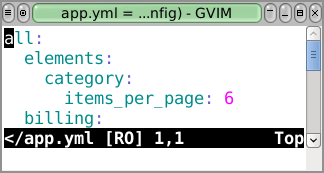
Editing YAML with VI

Put the following in your .vimrc file and you are set:

au BufNewFile,BufRead *.yaml,*.yml set et ts=2 sw=2

When you will be editing YAML files, you’ll automatically have the following behaviour:

  • et – expand tabs – puts spaces whenever you use tabs
  • ts=2 – tab stop – 2 spaces per tab
  • sw=2 – shift width – 2 spaces to move with < and > commands

YAML in VI

Debian kernel upgrade to 2.6.30

Debian testing just got kenrel 2.6.30. The previous version was 2.6.26.
I will summarize here the new features for the upgrade but only the ones I will find interesting.

2.6.30

  • POHMELFS – kernel client for the developed distributed parallel internet filesystem
  • DST – network block device storage
  • LZMA/BZIP2 kernel image compression. The kernel size is about 10 per cent smaller with bzip2 in comparison to gzip, and about 33 per cent smaller with lzma.
  • SR-IOV support – PCI virtualization helper
  • Networking: Allowing more than 64k connections and heavily optimize bind(0) time.
  • Virtualization: virtio_net: Allow setting the MAC address of the NIC
  • Many Bluetooth improvements

2.6.29

  • WiMAX (Intel Wireless WiMAX/Wi-Fi Link 5×50 USB/SDIO devices)
  • Filesystem freeze (LWN has very technical article about this)
  • Support for multiple instances of devpts
  • MD: Allow md devices to be created by name, make devices disappear when they are no longer needed
  • Xen: add xenfs to allow usermode and Xen interaction
  • USB: storage: recognizing and enabling Nokia 5200 cell phones
  • Bluetooth: Add suspend/resume support to btusb driver

2.6.28

  • Memory management Scalability improvements (technical details on LWN)
  • NFS: authenticated deep mounting
  • Port redirection support for TCP
  • gre: Add Transparent Ethernet Bridging
  • Support discard requests on SSD devices to improve wear-leveling
  • Add generic ATA/ATAPI disk driver

2.6.27

  • Multiqueue networking
  • ftrace, sysprof support – another tracing mechanism for kernel (not related to SystemTap)
  • Improved video camera support with the gspca driver. (List of devices is at LWN)
  • Add HTC Shift Touchscreen Driver
  • Bluetooth: Track status of Simple Pairing mode and remote Simple Pairing mode
  • HP iLO driver

The sources (full lists of changes):

  1. http://kernelnewbies.org/Linux_2_6_30
  2. http://kernelnewbies.org/Linux_2_6_29
  3. http://kernelnewbies.org/Linux_2_6_28
  4. http://kernelnewbies.org/Linux_2_6_27

Web programmers should know

Here is a checklist of knowledge and abilities which I consider a must for a good web programmer.

  • HTML, w3.org standards and validator
  • AJAX
  • SQL: multiple column indexes, transactions
  • The following programming languages exist: PHP, Python, Ruby.
  • Program in at least one of the languages above
  • Program in C at least a bit
  • What is JVM and bytecode
  • What is SQL injection and how to prevent it
  • How DNS works, at least in general – what server and clients do
  • How routing works, at least in general. Tunneling. NAT. BGP is a plus
  • HTTP and HTTPS
  • Load balancing and it’s session persistence problem and how it’s usually solved
  • HTTP proxy, what it solves and how it works
  • What’s FTP
  • What’s version control and what it solves
  • How SMTP works, at least in general. POP3 and IMAP a plus
  • What’s character encoding and why UTF-8 rules

If it’s someone expected to work with Linux the following applies:

I’ll be adding to the list as soon as I remember anything important enough.
Suggestions for additional points are welcome.